Project Type: Internal Tool
Tech Stack: React • Vite • Vercel
Duration: Built the night before the event
The Problem
I shared how I built a system to automate result publishing during our arts program.
But another challenge still remained.
The schedule.
Our event had 120+ competitions across two days, spread over multiple stages and categories. Preparing the schedule was never just about assigning time slots.
Every decision affected something else.
Some of the common issues were:
- Two programs from the same category running at the same time
- Multiple programs accidentally assigned to the same stage
- Similar competitions scheduled back-to-back, reducing audience engagement
- Last-minute edits creating new conflicts elsewhere
The schedule was usually prepared manually by a small team using paper, Google Docs, and Google Sheets. It worked, but every change required another round of checking.
One mistake in the schedule could affect the entire event.
The Idea
The night before the event, while the schedule was still being revised because of repeated conflicts, I decided to build a dedicated scheduling tool.
Not a generic planner.
Just something built specifically for our event.
A Quick Look
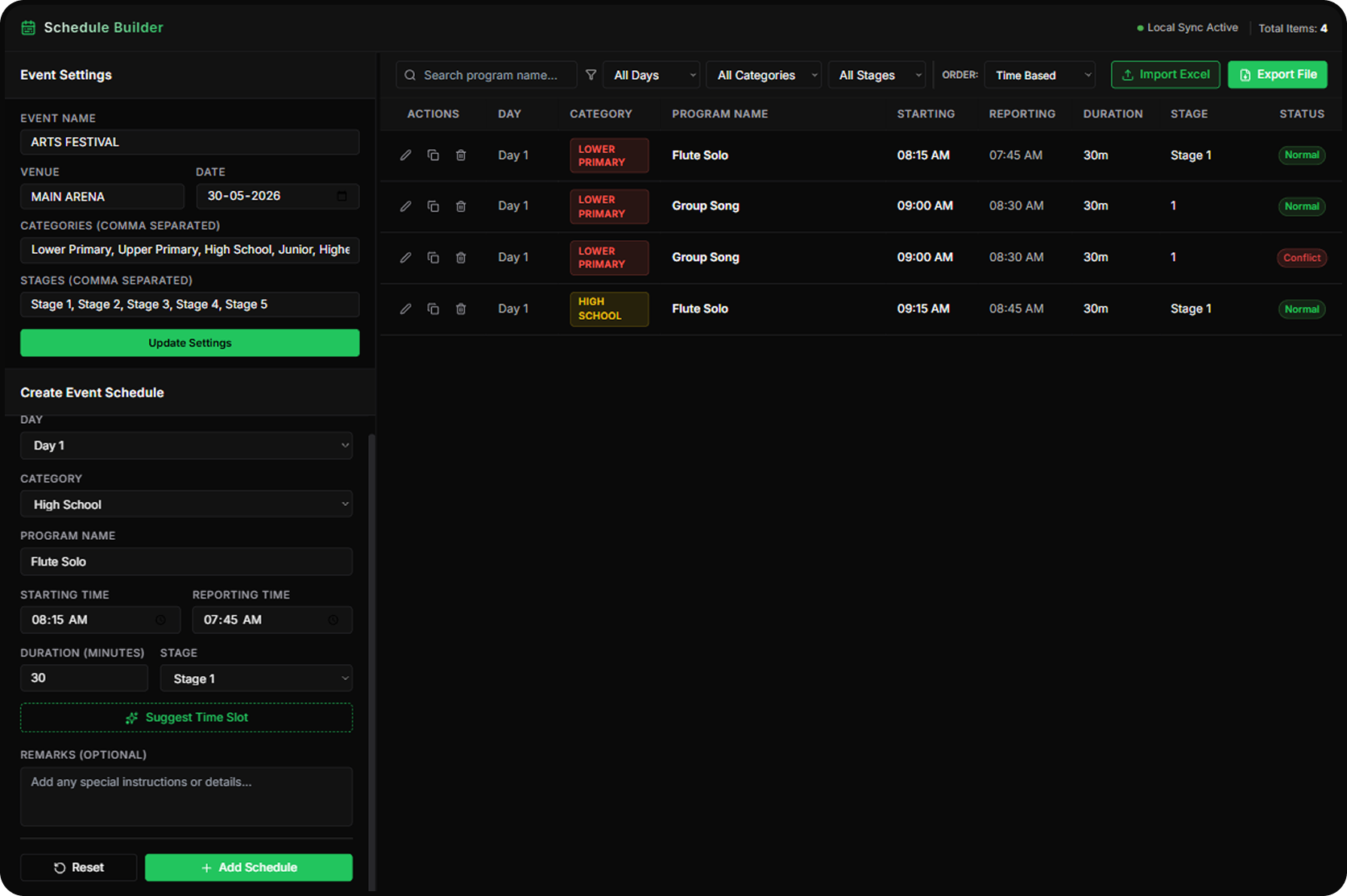
The interface focuses on making schedule creation and editing as simple as possible.
What It Can Do
| Feature | Purpose |
|---|---|
| Program Management | Add and edit competitions |
| Time & Stage Allocation | Assign slots quickly |
| Conflict Detection | Prevent overlapping schedules |
| Duration Calculation | Automatically calculate timings |
| CSV Import | Import existing schedules |
| Export | PDF, Excel and Image |
| Multiple Views | Category-wise, Stage-wise and Time-wise |
| Mobile Friendly | Easy access during the event |
The Best Feature
Conflict Detection
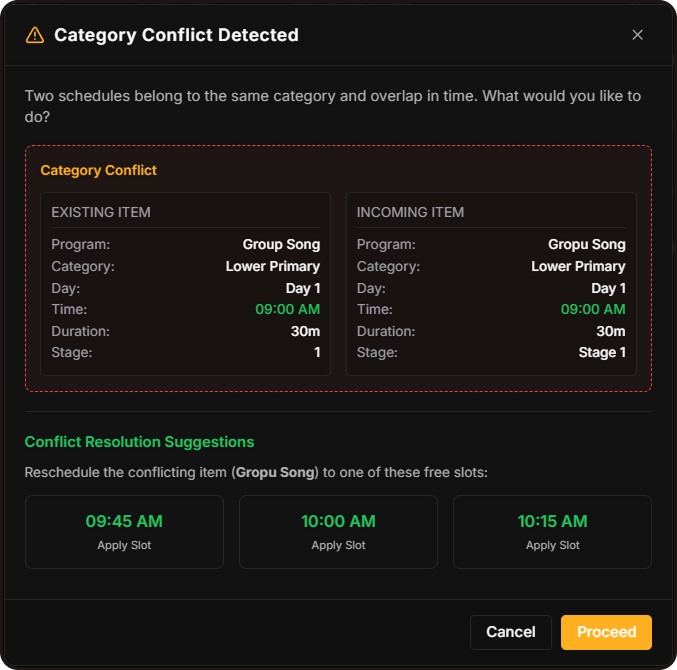
Instead of manually checking every program, the builder immediately reports conflicts and explains why they occur.
For example:
- Same stage booked twice
- Same category overlapping
- Duration conflicts
- Timing overlaps
This saved a huge amount of manual verification.
One Small Moment That Made Me Smile
The schedule team had already prepared a rough schedule manually.
I converted it into a CSV using AI, imported it into the Schedule Builder, fixed the detected conflicts, and generated multiple schedule formats within minutes.
Everyone was surprised by how quickly the entire process was completed.
Behind the Scenes
The difficult part wasn't designing the interface.
It was designing the logic.
The system had to:
- Detect overlapping programs
- Handle duration calculations
- Balance venues
- Allow last-minute edits
- Stay simple enough for anyone to use
Outcome
Instead of spending hours checking schedules manually, the team could focus on organizing the event.
Improvements
| Before | After |
|---|---|
| Manual checking | Automatic conflict detection |
| Multiple revisions | Faster editing |
| High chance of mistakes | Much fewer errors |
| Different schedule files | One source, multiple exports |
Final Thoughts
This tool wasn't built for thousands of users.
It was built to solve one real problem for one real event.
Sometimes those are the most satisfying projects to build.
Try the Schedule Builder
You can explore the Schedule Builder if you're curious.
It's built specifically for our arts program, so it isn't intended to be a universal scheduling platform.
I'd genuinely love to hear your thoughts, suggestions, or ideas after trying it.